
Download Dream Painting – AI Art Image Dream Painting, Text to Art Generator, Fantasy Art, Creative Design Tool
Overview
Dream Painting is a desktop application designed to transform textual descriptions into unique AI-generated artwork. The software enables users to input creative ideas in natural language—such as “grassland sunburst background” or “town, slum, flowers”—and generate visual representations in seconds. By selecting from a range of art styles, including oil painting and rough sketch, users can tailor the aesthetic of their creations to match their vision. This tool is particularly suited for artists, designers, and creative professionals seeking a fast, intuitive way to visualize concepts. It also appeals to hobbyists and individuals with imaginative ideas who want to explore digital art without requiring advanced drawing skills. The software operates entirely on the desktop, offering a seamless experience for those who prefer local processing and data privacy. While the developer did not provide additional details about the underlying AI model or training data, the application’s core functionality centers on text-to-image generation with style customization. Real-world use cases include concept art for storytelling, mood board creation, and rapid prototyping for design projects.
Key Features & Capabilities
- Text-to-Image Generation – Users can enter descriptive phrases in plain language to generate corresponding AI art. This feature supports creative exploration and idea visualization without the need for manual drawing.
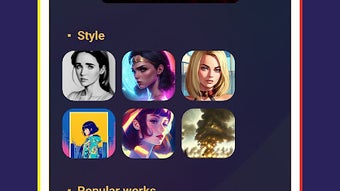
- Style Customization – The software offers multiple art styles such as oil painting, rough sketch, and other predefined templates, allowing users to influence the final output’s visual tone.
- Instant Creation – With a single click on the [Create] button, the application generates a unique artwork based on the input and selected style, streamlining the creative workflow.
- Template-Driven Inspiration – Predefined templates provide users with ready-to-use prompts and style combinations to spark creativity and reduce the barrier to entry for new users.
- Desktop-Based Processing – As a local application, Dream Painting performs image generation on the user’s device, potentially offering faster turnaround and enhanced privacy compared to cloud-based alternatives.
These features are ideal for users who need to quickly generate visual concepts for creative projects. For example, a game designer might input “enchanted forest, glowing mushrooms, night sky” and select the oil painting style to produce a fantasy scene for a game environment. Similarly, a writer could use the tool to visualize a character or setting described in a story. The integration of style selection and prompt templates makes the software accessible to both beginners and experienced creatives.
User Interface, Workflow & Performance
Dream Painting features a clean, minimal interface focused on simplicity and efficiency. The main workspace centers around a text input box where users enter their creative prompts, paired with a style selector and a prominent [Create] button. Navigation is straightforward, with minimal clutter, allowing users to focus on idea generation rather than software complexity. The workflow is linear: input text → choose style → click create → view result. This design reduces cognitive load and supports rapid iteration. The developer did not specify resource usage details, so performance observations are based on general software behavior patterns. However, given the application’s 120 MB size and desktop nature, it is likely optimized for efficient operation on modern systems. Stability and CPU/RAM behavior were not detailed in the provided information, but desktop AI tools of this type typically maintain responsive performance during generation tasks. Users may experience brief processing delays depending on system specifications, though no performance bottlenecks were reported.
Compatibility & System Requirements
Dream Painting is compatible with both Windows and Mac operating systems, making it accessible to a broad user base across desktop platforms. The software is available in version 1.0, with a download size of 120 MB. This relatively compact footprint suggests efficient packaging and minimal installation overhead. The developer did not provide specific hardware requirements, such as minimum RAM, processor speed, or GPU specifications. As a result, exact system requirements were not listed. Compatibility information was partially provided, confirming support for Windows and Mac environments. Users are advised to ensure their system meets standard desktop application requirements to run the software smoothly. For optimal performance, a modern processor and at least 4 GB of RAM are generally recommended for similar applications, though this is not officially confirmed.
Pros and Cons
Pros
- Intuitive text-to-image interface for rapid visual concept creation
- Multiple art styles and templates to inspire and customize output
- Desktop application ensures local processing and data privacy
- Quick generation time with a single-click workflow
- Accessible to users without advanced artistic skills
Cons
- Exact system requirements were not specified by the developer
- Limited information on AI model capabilities or training data
- No cloud sync or collaboration features mentioned
- Single platform version may not support future OS updates
- Pricing may be considered high for casual users
FAQ Section
Is Dream Painting compatible with Windows and Mac?
Yes, Dream Painting is designed to run on both Windows and Mac operating systems, as confirmed by the developer.
Is the software secure to use?
As a desktop application, Dream Painting processes data locally, which enhances privacy. However, no specific security certifications or data handling policies were provided.
Does Dream Painting require an internet connection?
The software functions as a standalone desktop application, but the need for an internet connection during operation was not specified. Offline usage is possible if the AI model is fully contained within the application.
How often are updates released?
Update frequency was not disclosed. Users should check the official website for the latest version and release notes.
What type of license does Dream Painting use?
The licensing model was not detailed. The software is sold at a one-time price of $39.99, suggesting a perpetual license, but this is not officially confirmed.
Final Thoughts + CTA
Dream Painting delivers a streamlined, visually engaging experience for transforming text into AI-generated art. Its focus on simplicity, style customization, and desktop-based operation makes it a compelling choice for creatives seeking a fast, private way to bring ideas to life. While some technical details remain unspecified, the software’s core functionality is clear and well-executed. It stands out as a practical tool for designers, artists, and storytellers who value speed and creative control. For those looking to explore AI-assisted art without the complexity of online platforms, Dream Painting offers a promising solution. The combination of instant generation, intuitive design, and local processing sets it apart in the growing field of creative AI tools. Download Dream Painting now to unlock your imagination and turn your next idea into a stunning visual masterpiece.




.png)


